![buildwitt-logo-light.svg]](https://info.buildwitt.com/hubfs/2022%20-%20BuildWitt/buildwitt-logo-light.svg)
- As an admin, log in to Improve at train.buildwitt.com.
- From the top navigation, select Admin.
- From the left-hand menu, select Team Progress.
- Select your date range. The dashboard defaults to This Week. You can choose:
- This Week
- This Month
- This Year
- Custom Range
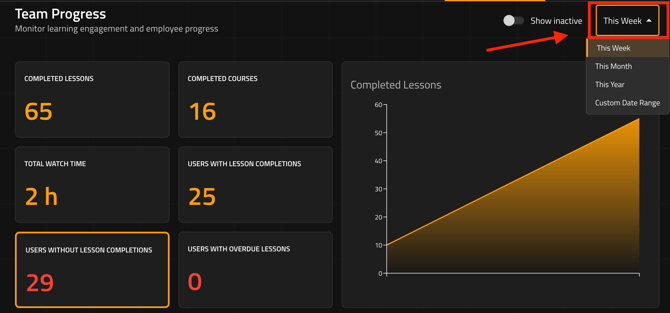
- Once your date range is selected, the dashboard will update with data for that period.
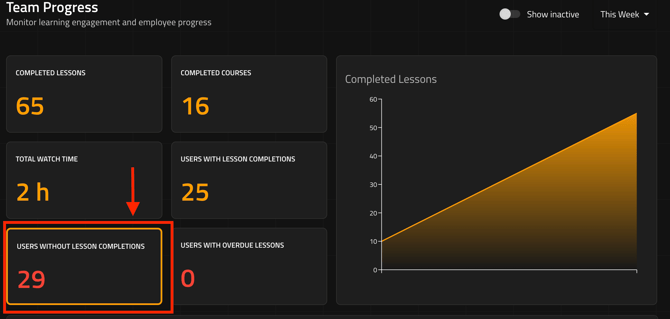
- In the bottom-left section of the dashboard, locate Users Without Lesson Completions.
- Select Users Without Lesson Completions to open a detailed report in the table below showing users who have not completed any lessons during the selected date range.
- Customize the report by selecting which columns you want to display in the table. This allows you to focus on the information most useful for follow up.
Using this Report for Follow Up
The Users Without Lesson Completions report can help admins identify team members who may benefit from additional outreach, reminders, or support.
For example, admins can use the report to:
- Identify users who have not engaged recently
- Follow up with individuals who may need help accessing Improve
- Look for patterns in engagement across teams or groups
- Support ongoing training and adoption efforts
Tip: The results are based on the date range selected in Team Progress. If you're looking for users who have not completed a lesson recently, be sure to select a range that matches the period you're evaluating.