![buildwitt-logo-light.svg]](https://info.buildwitt.com/hubfs/2022%20-%20BuildWitt/buildwitt-logo-light.svg)
Today's Learning respects the company calendar configured in BuildWitt Accounts.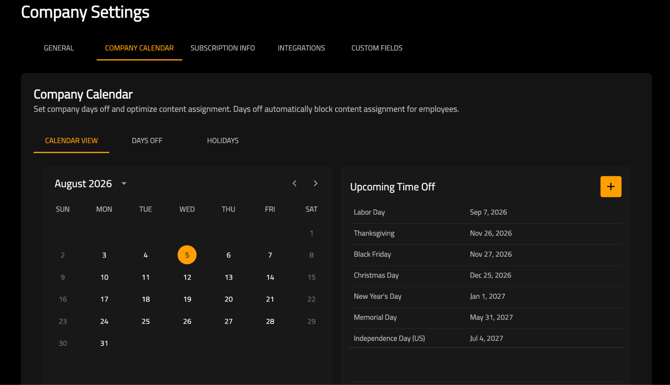
- New content is only delivered on scheduled "on" days.
- On "off" days, no new content is displayed. Learners can still access and complete content they are already enrolled in. Overdue content will still display on off days.
Content Priority
When determining what appears in Today's Learning, BuildWitt Improve prioritizes content in the following order:
- Overdue Content
- Admin-assigned content with the closest upcoming due date
- Admin-assigned content without a due date
- Self-enrolled content
- Auto-assigned content
Auto-Assignments
If a learner has no admin-assigned or self-enrolled content available, BuildWitt Improve automatically assigns new training.
The platform is designed to keep learners progressing through a balanced mix of content. In general, auto-assignments deliver content types weighted as follows:
- 2× Job Training
- 1× Personal Development
- 1× Professional Development
- 1× Safety
This weighting helps ensure learners receive a variety of relevant training while emphasizing job-specific skills.
Attributes that affect selection are: job titles, work categories, content type, access/eligibility, already enrolled, Hide From Team, and current active mix.
When a category has no eligible content, remaining slots backfill from Job Training and random shuffle.
What is Excluded From Auto-Assignments?
-
Unpublished courses
- Courses that are "Hidden From Team"
Daily Assignment Limit
The number of lessons shown in Today's Learning is controlled by the Daily Assignment Limit, which can be configured in:
Admin → Content Settings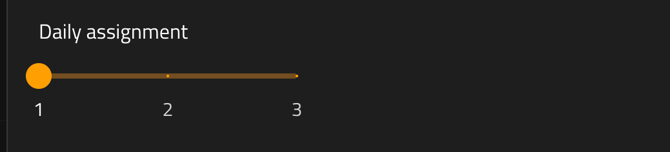
Learners will receive the configured number of lessons each scheduled day.
Due Date Exception
If an administrator assigns content with a due date and the learner is falling behind, BuildWitt Improve may temporarily exceed the Daily Assignment Limit to help ensure all required lessons can be completed before the due date.
Due Dates and Overdue Content
-
Due dates are only created when an administrator assigns a due date to a lesson, course, or playlist.
-
Only content with an assigned due date can become Overdue.
-
Automatically assigned content and self-enrolled content do not become overdue.
FAQs
-
What happens if a user completes all content?
- If no new content exists, auto-assigned content will be re-delivered with oldest completions first
- What if I think the content I am receiving is not relevant?
- While all efforts are made to assign content specific to your role and organization, BuildWitt Improve auto-assigns videos to reduce the amount of administrative work needed for everyone to watch a video every day. The content may not apply specifically to being a pipelayer that day, but it talks about the Dirt World, which can help you become more well rounded and interested in what might be going on in heavy civil construction.