![buildwitt-logo-light.svg]](https://info.buildwitt.com/hubfs/2022%20-%20BuildWitt/buildwitt-logo-light.svg)
New Features
-
Improve is now buildwitt
BuildWitt Improve is now simply buildwitt. You'll notice an updated logo both in the app/web and in thr app store. While the name and look have changed, the product you know and use every day remains the same-- just better. -
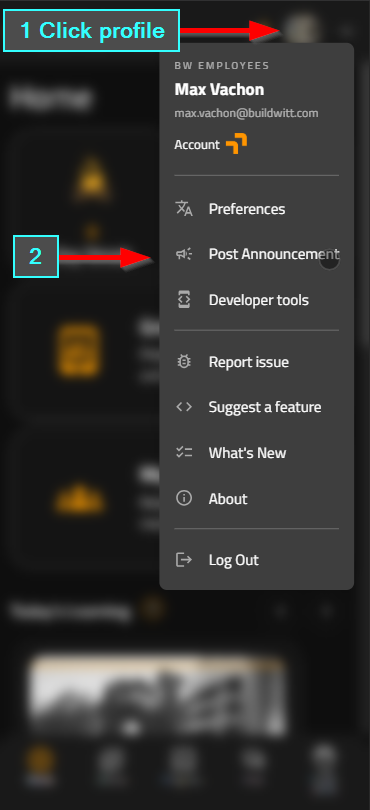
Announcements from your phone or tablet (Admins)
You can now create and send announcements from a mobile device, so there's no need to get behind a laptop. We've also streamlined the announcement experience on web to allow for a simple layout for admins to create and send a announcement.
-
Content Library filters
A new Filters menu on web and mobile helps you narrow your content list. Filter by:
- Completion: Not completed or Completed
- Assignment: Assigned or Not assigned
- Category: Job Training, Personal Development, Professional Development, Safety, or Others
- Author: Choose from content creators, (buildwitt, 1st Phorm, Sitech Intermountain)
- Date added: Last 7, 30, or 90 days
-
Completed courses move to the end of the carousel
On web and mobile, completed courses now move to the end of the carousel. Users can find content they haven't viewed yet more easily.
-
Select All for enrollment (Admins)
On the enrollment tab for courses and lessons, admins can now check the box in the top left corner of the table header to select all employees at the organization. You can get a lesson or course out to everyone quickly.
-
Shared buildwitt playlists
Admins can now select shared playlists built via buildwitt's recommended structure for key roles, such as Skilled Labor, Operator Fundamentals & specific equipment (Excavator/Dozer), Field Supervisor, Safety Professional, Survey Construction Tech. Use them as is, or edit them by adding or removing courses. Stay tuned as we continue to release additional Shared Playlist!
-
Carousel: My Company's Content
New carousel in the library that features the custom courses created by your organization.
-
Carousel: What's New
New carousel in the library taht features courses added to the buildwitt Library in the last 90 days
-
Link a course or lesson:
You can now quickly link to a specific course or lesson and send it by text/email/message (teams, chat). Tap the share button in the video player. Anyone who has the app on mobile opens it lands directly on that content, so sharing with a teammate takes just a few seconds.
Coming Saturday, 11/7
-
Group Watch
Group Watch lets supervisors run lessons with their crews. For it to work well, employees must have a supervisor set on their user. Anyone listed as a supervisor, and anyone with the admin role, will have access. Learn more in the knowledge base
-
Chat
Chat is a new field-first way to communicate across teams on projects, general updates, and coordination, all in one place. Chat creates channels based on your divisions, so please check that divisions are configured for your employees. Spelling and casing matter, because they carry over into Chat.
buildwitt Accounts
- Division remapping
You can now update division mappings after your initial HRIS connection is established, without setting up the integration again. For example, if your company was syncing only its pipe division and now wants to add its earthworks team, you can make that change directly in the UI. You can also exclude divisions the same way.
Content
Bug Fixes
- Brightcove player failing to load on embedded training
- Video playback failures, including slow load times
- Linear progression blocking the the progress on a playlist enrollment
- iPad Safari: large empty black band below the footer
- Team Progress chart rendering at about half height
- "Mark as Completed" re-locking after pause, after a video ends early, and after restarting a video
- Content Library "Date added" filter using UTC instead of local time
- Fixed the issue with the header and footer being applied to video playback when rotating the mobile phone to landscape.